
Static pages
Permanent app pages: "About us", "Delivery terms", "Contacts", the terms of service and the privacy policy. Unlike posts, they do not belong to sections.
How to open it
The rail, the App group, Content, the Pages tab.
What you can do
- Browse the list of static pages
- Create, edit and delete pages
The interface
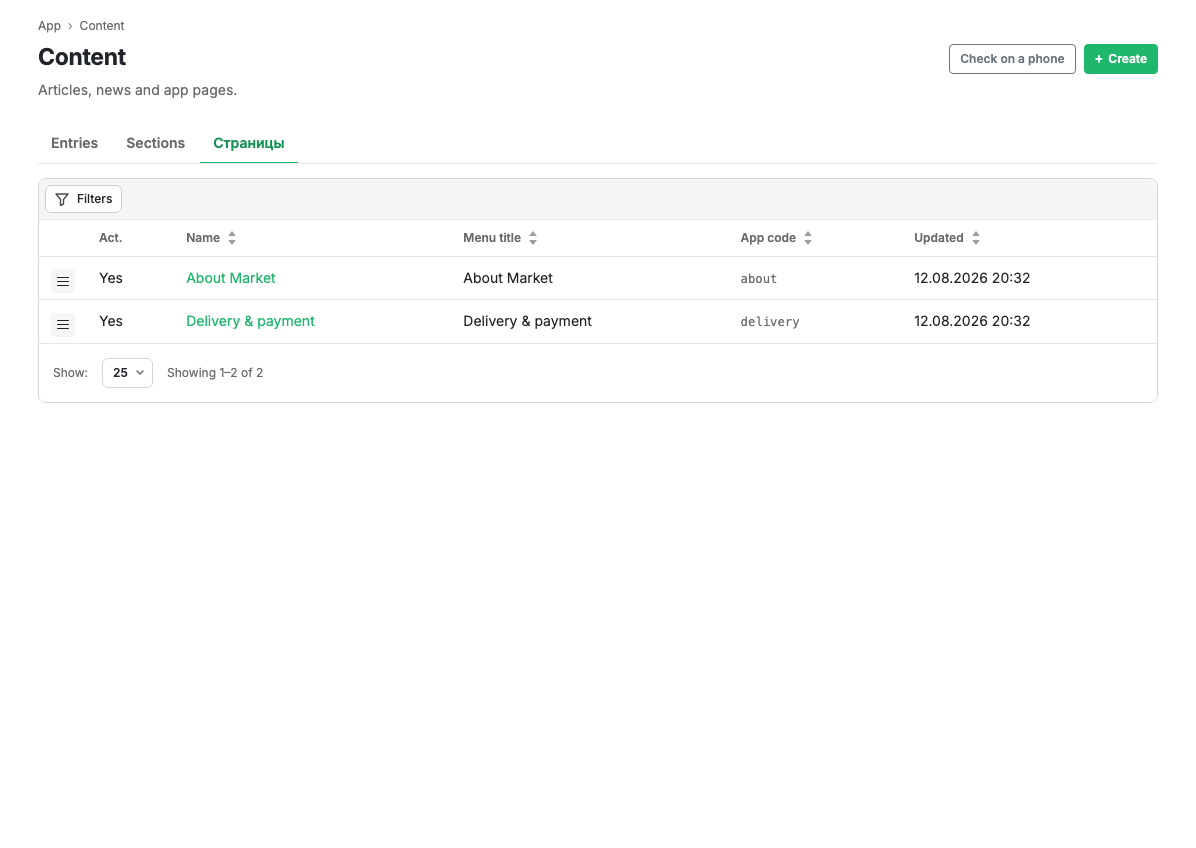
| Column | Contents |
|---|---|
| Act. | Whether the page is visible in the app |
| Name | The page name. Clickable, opens the card |
| Menu name | How the page is labelled in the app menu |
| Code | The technical code of the page |
| Updated | Date and time of the last change |
The Filters button opens filtering by name, code and activity. The menu at the start of a row opens the page card and deletion.
Scenarios
Create a page
- Press Create in the page header.
- Fill in the card and save.
Limits and caveats
- The terms of service and the privacy policy are required for publication in the app stores: without them review will not pass. The text of the agreements shown at sign-in is configured separately, in Authorisation.
Related pages
Updated 04.09.2026 18:04
Was this page helpful?