
Store
The details by which a shopper recognises and finds you: name, phone, messengers, points of sale and the tax data that goes on a receipt.
How to open it
Settings, the Store group.
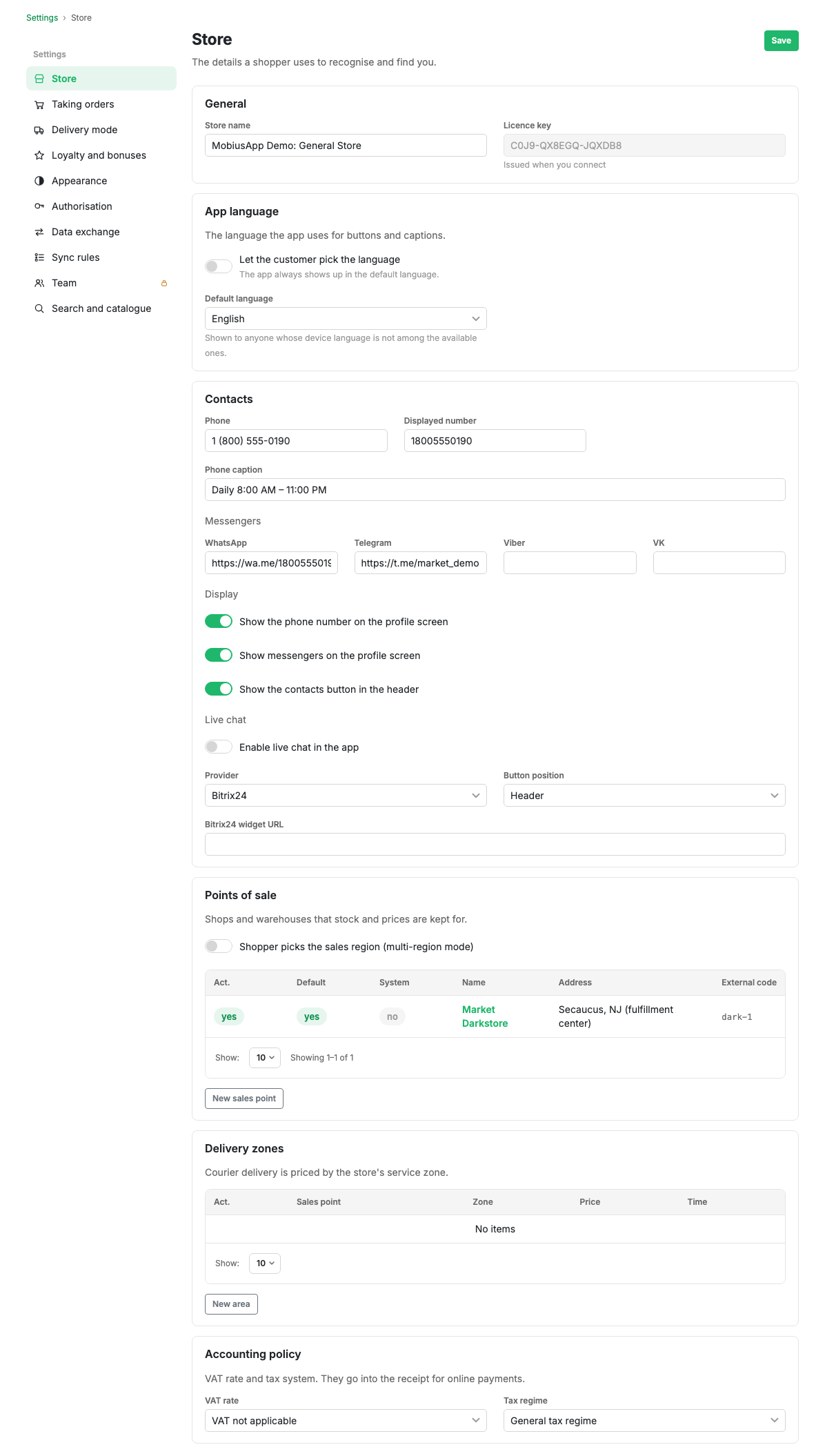
General
- Shop name. It is shown to the shopper in the app and used in emails and notifications.
- Licence key. Issued when you are connected and cannot be changed. You need it when contacting support.
App language
This controls the language of the storefront buttons and captions, not the language of your products and sections: those stay as you entered them.
- Shoppers can choose the language. While this is off, the app always shows the default language.
- Default language. Seen by anyone whose device language does not match any of the available ones.
Contacts
- Phone as the shopper sees it, and the display number for dialling.
- Phone caption: opening hours or a note, for example "Daily 8:00-23:00".
- Messengers: WhatsApp, Telegram, Viber, VKontakte. An empty field means "do not show".
- Display: whether to show the phone and messengers on the profile screen and whether to put a contacts button in the app header.
Live chat
A separate switch turns on a support chat inside the app. You choose the provider and where the button sits: in the header or bottom right. The provider needs the address of its widget.
Points of sale
Shops and warehouses that stock and prices are tracked against. The multi-region switch lives here too: it lets the shopper choose a sales region, and prices and availability start depending on that choice.
The table shows whether a point is active, whether it is the main one, whether it is a system point (a warehouse for accounting that shoppers never see), plus its name, address and external code.
The "New point of sale" button opens the point card. The full list with filters is on the Points of sale page.
Delivery zones
An area on the map that a point of sale delivers to, with its own price and delivery time. You need them when a courier is charged by distance rather than by city, which is usually the case for food and water delivery.
The "New zone" button opens the zone card.
Tax policy
The VAT rate and the taxation system. They go onto the receipt for online payments, so fill them in before connecting an acquirer.
Limits and caveats
- Prices and stock belong to a point of sale. With a single point everything is attached to it automatically; as soon as there is more than one, a product gets a price and a stock figure per point.
- Shoppers never see a system point, but its stock counts towards accounting.
- The Save button is one per settings group and saves every block on the page at once.