
Loyalty and bonuses
The general parameters of the bonus system: switching it on, the conversion rate, the redemption cap, activation and expiry, how bonuses are calculated and how they are shown in the app.
How to open it
Settings, the Loyalty and bonuses group.
What you can do
- Switch the bonus system on and off
- Set the rate that converts bonuses into order currency
- Cap the share of an order that can be paid with bonuses
- Configure when bonuses activate and when they expire
- Give bonuses for signing up in the app
- Choose how bonuses are calculated
- Control how bonuses are shown in the mobile app
The interface
The heading and the Save button are at the top. The settings are grouped into blocks.
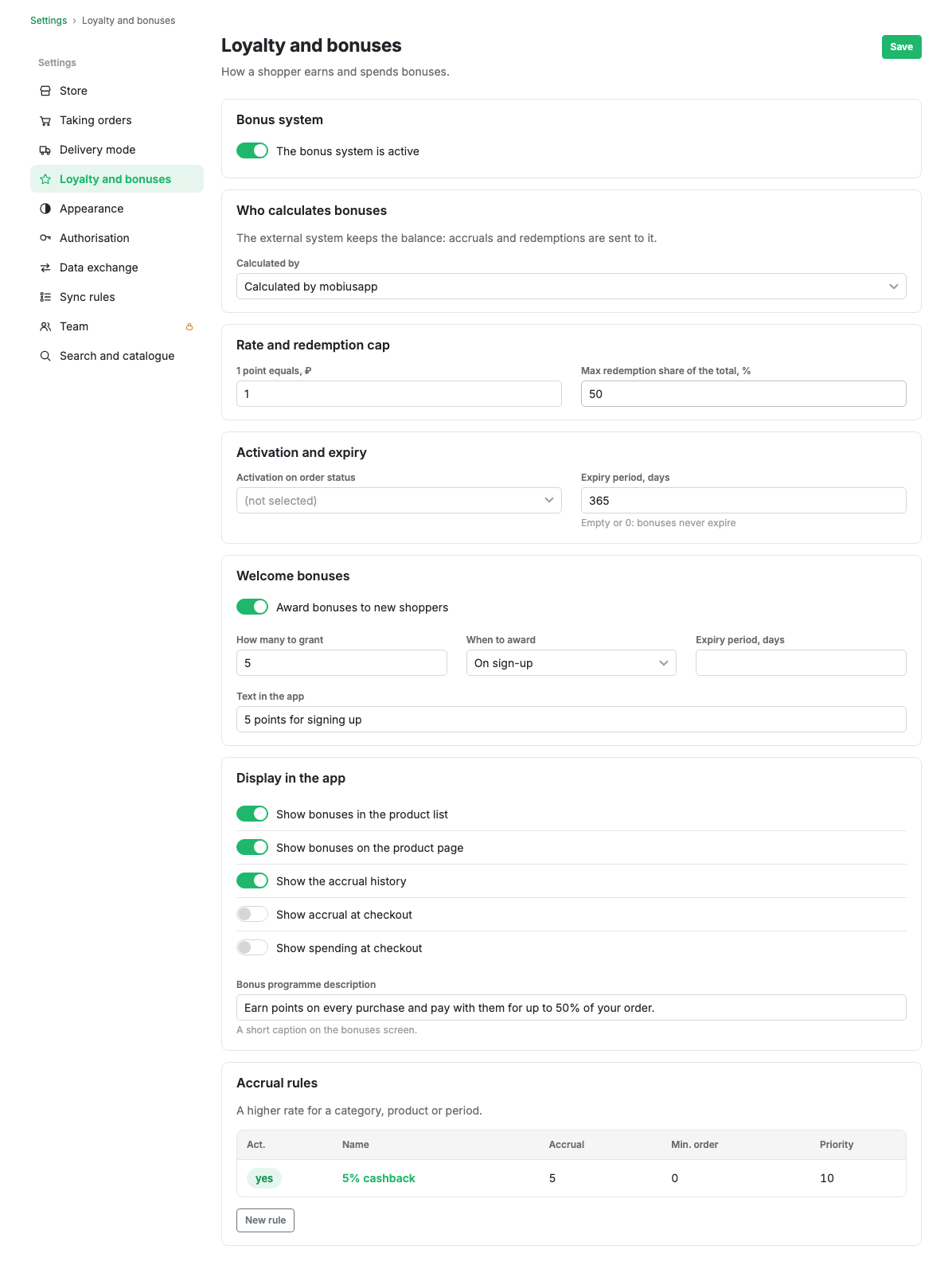
Bonus system active
The master switch. While the system is off, bonuses are neither accrued nor redeemed.
Conversion and redemption cap
- Conversion rate (1 bonus = N currency units): how many units of the order currency one bonus is worth. Required, greater than zero.
- Maximum redemption, % of the order: what share of an order can be covered with bonuses. Required, from 0 to 100.
Activation and expiry
- Activate at order status: the status at which accrued bonuses become available to spend. If none is chosen, accruals activate by default.
- Expiry, days: after how many days bonuses expire. Empty means bonuses never expire.
Welcome bonuses
A one-off gift to a new shopper for signing up in the app. Switched on with "Give bonuses for signing up", after which the gift size, the moment of accrual and the expiry appear.
How bonuses are calculated
- Bonus calculator: "Calculated by mobiusapp" accrues and redeems by the rules from the cabinet. "Calculated by an external system" hands the calculation to your own loyalty system.
An external calculator works through an outgoing webhook event: the subscriber returns the accrual and redemption amounts. See the outgoing webhooks section.
Display in the mobile app
- "About the programme" text: a description of the loyalty programme for the shopper.
- Show points in the product list: how many bonuses a purchase earns, right in the catalogue.
- Show points on the product card: the same on the product card.
- Show the operation history: the accrual and redemption history in the shopper's profile.
- Show accrual in the checkout form: how many bonuses the order will earn.
- Show redemption in the checkout form: the option to pay part of the order with bonuses.
Scenarios
Launch the bonus system
- Turn on "Bonus system active".
- Set the conversion rate and the redemption cap.
- Choose the activation status and, if needed, an expiry period.
- Configure how bonuses are shown in the app.
- Press Save.
- Add accrual rules.
Limits and caveats
- Without at least one accrual rule, the built-in calculator will not accrue anything.
- The conversion rate must be greater than zero, otherwise the settings will not save.
Related pages
Updated 04.09.2026 18:04