
Posts
Articles, news and promotion announcements inside the app. Every post belongs to a content section.
How to open it
The rail, the App group, Content, the Posts tab.
What you can do
- Browse the posts of every section in one table
- Filter and sort posts
- Create new posts
- Edit and delete posts
- Check how posts look in the app
The interface
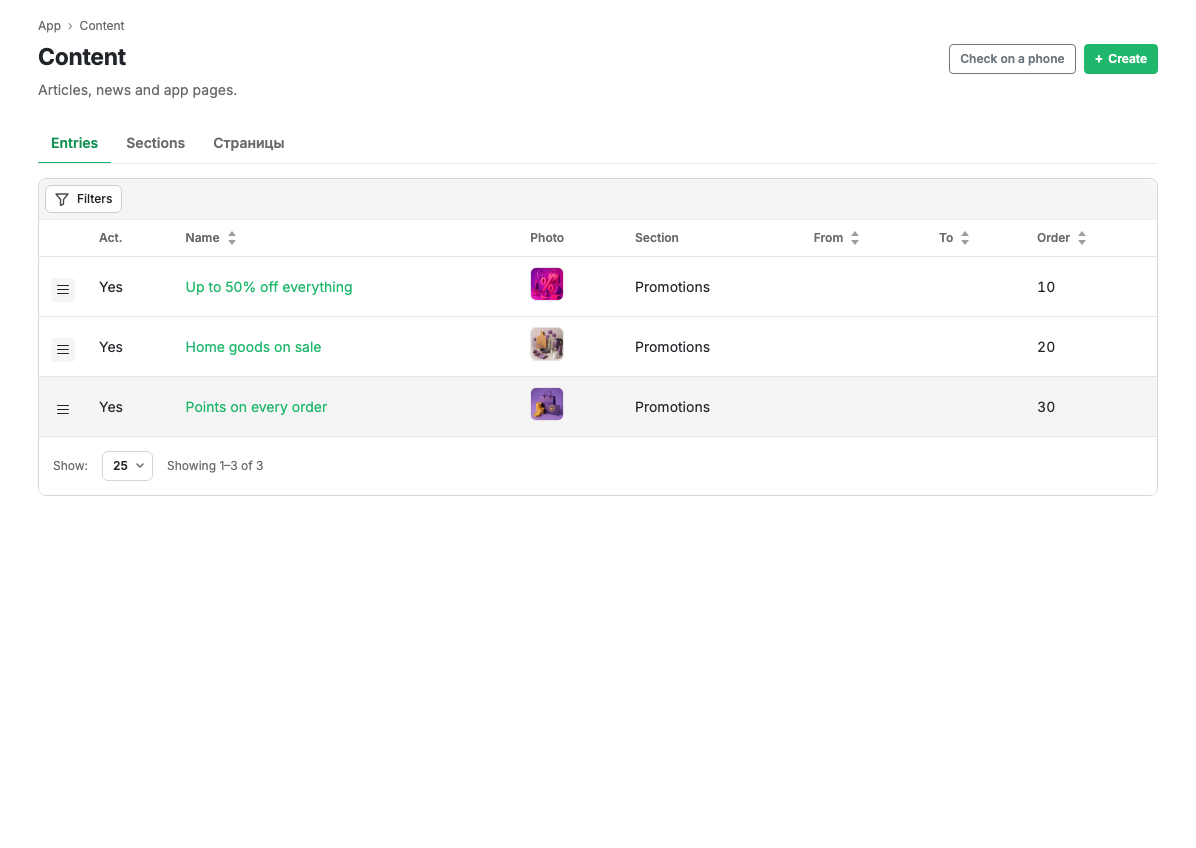
Table columns
| Column | Contents |
|---|---|
| Act. | Whether the post is visible in the app |
| Name | The post title. Clickable, opens the card |
| Photo | The post picture |
| Section | The content section the post belongs to |
| From / To | The display period |
| Ord. | The display order |
Sorting is available by name, display dates and order.
Filters
The Filters button opens filtering by name, section, activity and display period.
Row actions
The menu at the start of a row opens the post card and deletion with confirmation.
Header buttons
- Create adds a new post.
- Open on phone opens the demo environment.
Scenarios
Create a post
- Press Create.
- Fill in the title and text and choose a section.
- Save.
Limits and caveats
- A post always belongs to a section. If there are no sections yet, create one on the Sections tab.
- Display dates are only taken into account if the section has activity dates switched on.
Related pages
Updated 04.09.2026 18:04
Was this page helpful?