
Authorisation
How a shopper signs into the app and what they accept while doing so.
How to open it
Settings, the Authorisation group.
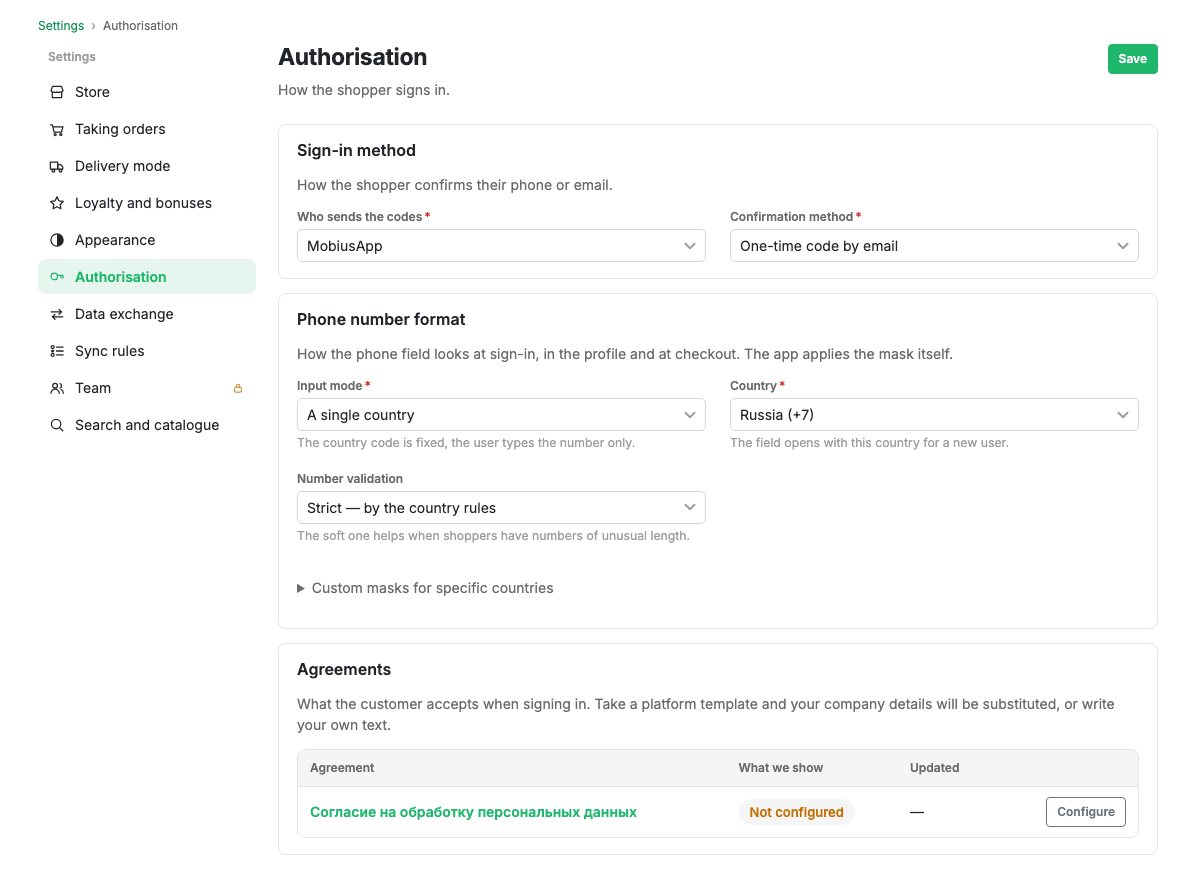
Sign-in method
Two fields:
- Who sends the codes: the platform or your own messaging service. Your own service makes sense when you already have a contract with an operator and a sender name.
- Confirmation method: a one-time code by SMS, a call with a code, a cascade of messages, or a one-time code by email.
A cascade tries the methods in turn: if the SMS does not arrive, a call follows. It costs more to set up but gets people signed in where a single channel fails.
Phone number format
How the phone field looks at sign-in, in the profile and at checkout. The app applies the mask itself.
- Input mode: a single country (the code is fixed and the shopper types only the number) or a country picker.
- Country: the one the field opens with for a new shopper.
- Number validation: strict, by the rules of the country, or lenient. Lenient is needed if your shoppers have numbers of non-standard length.
- Custom masks for individual countries: an expandable block for cases where the standard mask does not fit.
Agreements
What the shopper accepts at sign-in. You can take the platform template: your details are filled in from your profile. Or you can write your own text.
The table shows the agreement, exactly what the shopper is shown, and when the text was last updated. The Configure button opens the editor.
Limits and caveats
- Until the personal data consent is configured, the table shows a "Not configured" mark. That blocks publication: app stores require a privacy policy.
- Changing the confirmation method does not sign out people who are already in.
Related pages
Updated 04.09.2026 18:04