
Rule card
The form for creating and editing a bonus accrual rule.
How to open it
- New: the "New rule" button in the rule list.
- Editing: click the rule name or use the Edit action in the list.
What you can do
- Set the accrual size: a percentage or a fixed amount
- Limit the rule to products, categories or brands
- Set a minimum order value and a cap on bonuses per line
- Control the priority and the validity period
The interface
The heading and the Cancel and Save buttons are at the top. A saved rule shows its ID next to the heading.
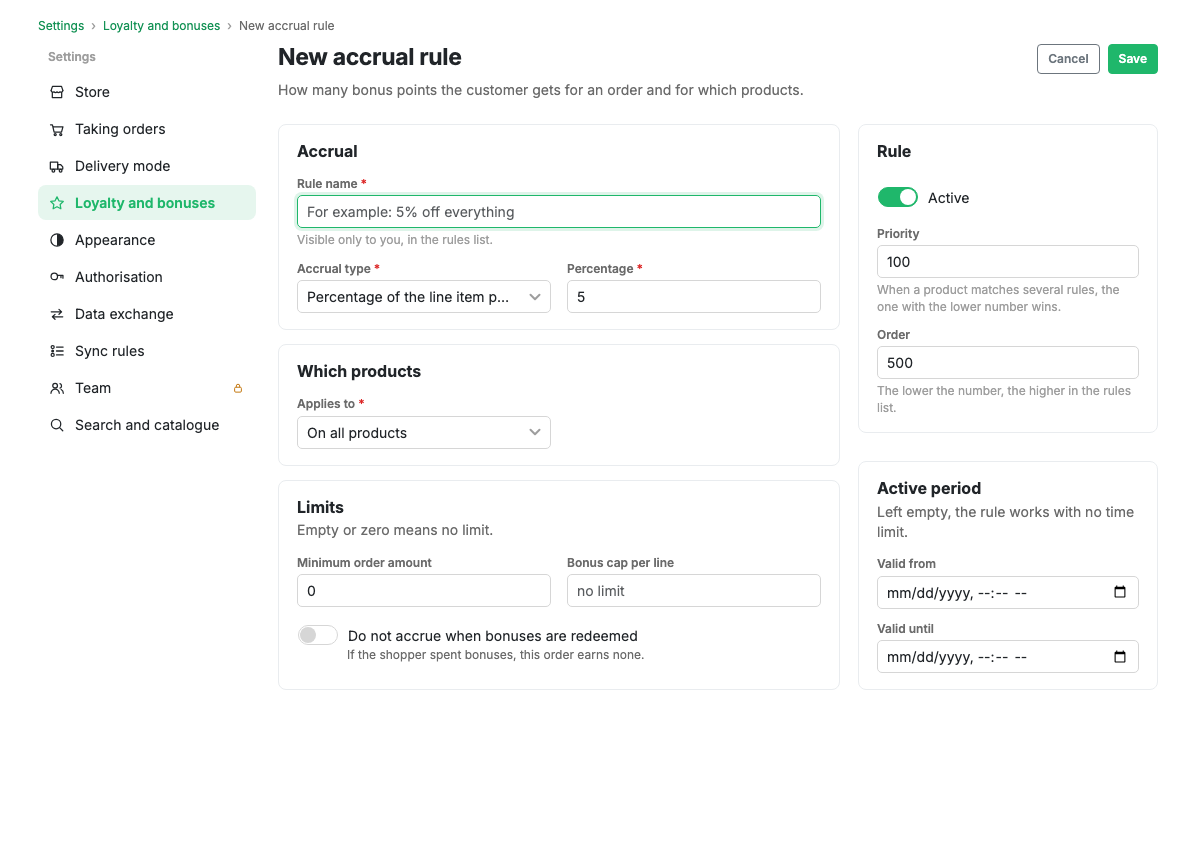
General
- Rule name: required.
- Active: whether the rule is on.
Accrual
- Accrual type: "Percentage of the line price" or "Fixed amount per unit".
- Value: for a percentage this is the percentage (0 to 100); for a fixed amount it is the number of bonuses per unit of product.
Scope
- Applies to: all products, specific products, categories or brands.
- IDs: if products, categories or brands are chosen, list their IDs separated
by commas, for example
12, 34, 56.
Limits and priority
- Minimum order value: the rule only fires on orders at or above this amount.
- Maximum bonuses per line: the upper bound of an accrual for one line. Empty means no limit.
- Priority: the smaller the number, the higher the priority. When several rules match, the one with the lower priority number wins.
- Ordering: the position in the list.
- Do not accrue when bonuses are redeemed: if the shopper spent bonuses on the order, this rule will not fire.
Validity period
- Valid from and valid until: the start and end date and time of the rule. Both may be left empty.
Scenarios
Higher cashback on one category
- Create a rule with the "Percentage of the line price" type and a value of 10, for example.
- Set the scope to categories and list the category IDs separated by commas.
- Set the campaign period if needed.
- Give it a lower priority number so it beats the general rule.
- Save the rule.
Limits and caveats
- For a percentage the value cannot exceed 100.
- When several rules match, only one applies: the one with the lowest priority number.
Related pages
Updated 04.09.2026 18:04
Was this page helpful?