
Delivery method
The card of a delivery service: a courier service or a pickup option that the shopper chooses at checkout.
How to open it
Settings, the Taking orders group, the Delivery tab, the "New method" button. To change an existing method, click its name in the table.
What you can do
- Create courier services and pickup options
- Switch a service on and off and set its order in the list
- Give a delivery time and an image
- Configure the handler parameters
- Limit a service by payer type and by location
The interface
The heading and the Cancel and Save buttons are at the top. A saved service shows its ID next to the heading.
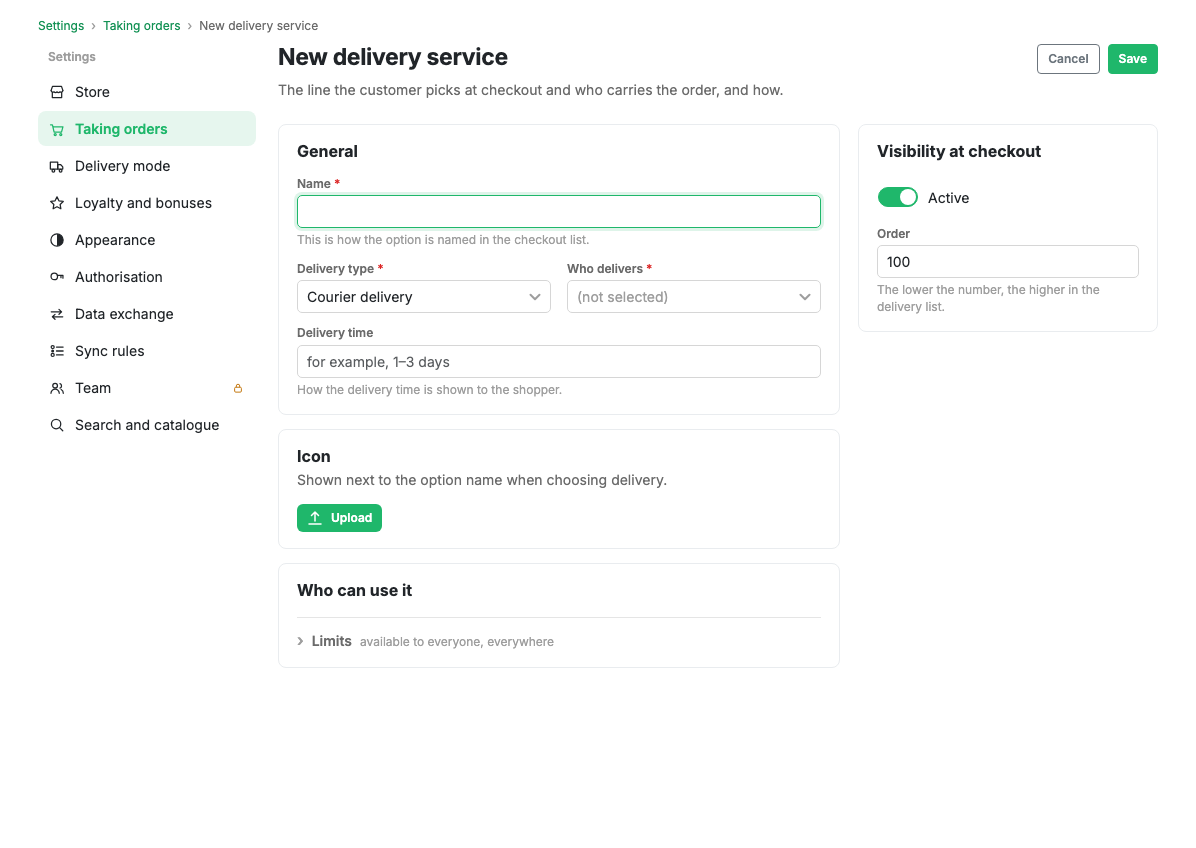
Main fields
- Name: required, shown to the shopper when choosing delivery.
- Ordering: the position in the delivery list. The smaller the number, the higher.
- Active: the switch for showing the service in the app.
Delivery parameters
- Delivery type: courier delivery or pickup. The type decides the list of handlers and the behaviour in the checkout form.
- Handler: the logic that calculates and arranges delivery. The list depends on the chosen type. Some handlers are built in (fixed price, free delivery), others connect external carriers.
- Delivery time: free text, for example "1-3 days". Shown to the shopper.
- Image: the service logo or icon.
Handler parameters
The set of fields depends on the chosen handler. For carrier integrations these are, for example, the origin city, the carrier tariff and the link to points of sale. Every field carries a hint.
Restrictions
- Available payer types: who the service is available to: individuals, legal entities or both.
- Included locations: the list of places where the service is available. If empty, it is available everywhere.
- Excluded locations: places where the service is not available.
Pickup points
For a saved pickup service, a table of its pickup points appears at the bottom of the card: name, address, code, opening hours, phone and activity. Pickup points are managed here, on the service card.
Scenarios
Add a courier service
- Press "New method" on the Delivery tab.
- Give the name and choose the courier delivery type.
- Choose a handler and fill in its parameters.
- Limit the service by location if needed.
- Press Save.
Add pickup
- Create a service with the pickup type.
- Save it.
- Add pickup points in the table below.
Limits and caveats
- The pickup point table is available only after the service is saved and only for the pickup type.
- Connecting external carriers can depend on your plan and requires the handler parameters to be filled in.
Related pages
Updated 04.09.2026 18:04
Was this page helpful?