
Bulk generation
When you need not one code but many personal ones, a code per newsletter subscriber for example, you create them in a batch. The discount terms are set once and applied to every code, while the codes themselves are generated random and unique.
How to open it
In the promo code list choose batch generation from the "..." menu.
What you can do
- Create up to 100 unique codes at once
- Set common discount terms for the whole batch
- Export the resulting codes to CSV straight away
The interface
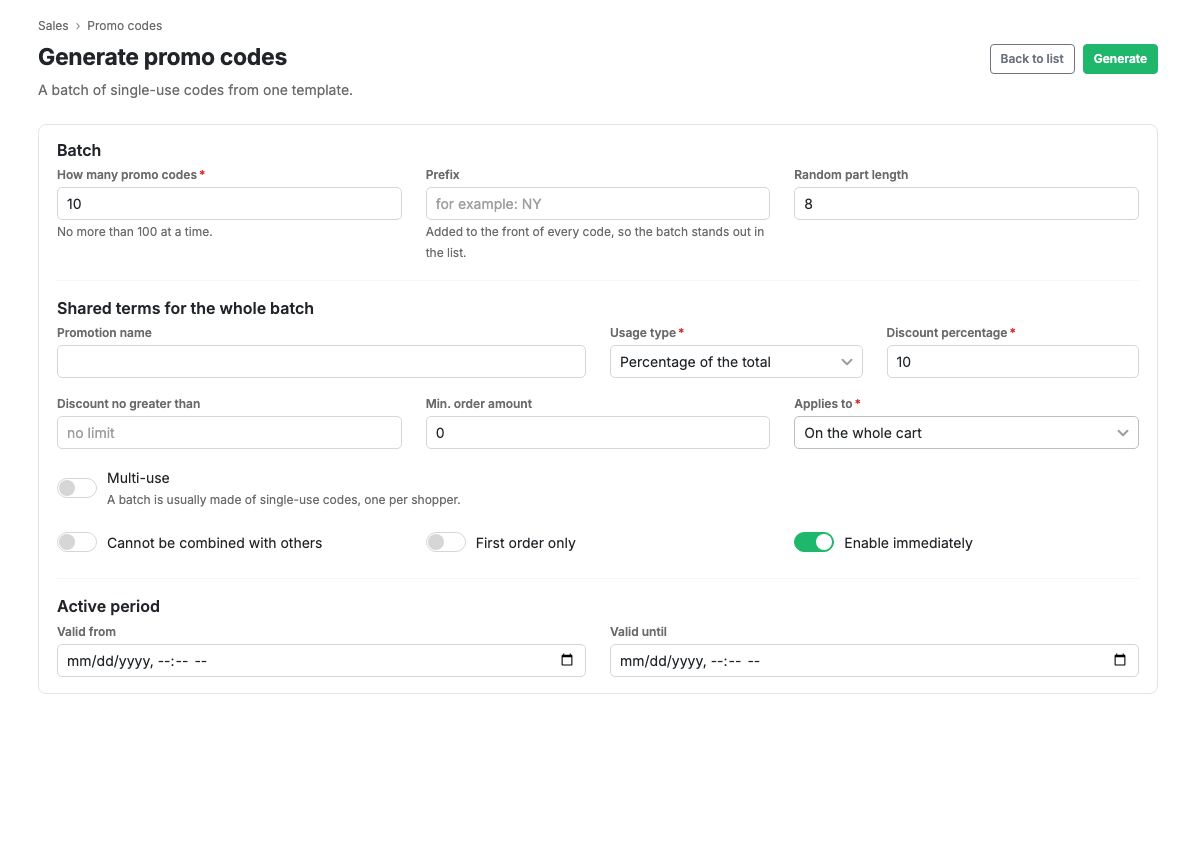
The batch
How many promo codes: from 1 to 100 at a time. If you need more, run the generation again.
Prefix: added to the start of every code. With it the batch is visible in the
common list and easy to find: codes like NY7K3QWM read as New Year ones at a
glance.
Length of the random part: how many characters follow the prefix. The shorter the code, the easier it is to dictate, but the higher the chance somebody guesses someone else's. For personal mailings use at least 8.
Codes avoid characters that are easy to confuse: zero and "O", one and "I". Somebody will be copying the code off paper or reading it out over the phone.
Common terms for the whole batch
The same fields as on the promo code card: discount type and value, discount ceiling, minimum order value, scope, usage limits, validity period.
By default a batch is made of single-use codes, which is usually what is wanted: one code per shopper.
After generation
A green block with the list of created codes and an Export batch to CSV button appears at the top. The file contains only this batch.
Scenarios
Codes for a New Year mailing
- Choose batch generation.
- Set the quantity, 100 for example.
- Put
NYin the prefix and leave the length at 8. - Set the terms: type "Percentage", value 15, a minimum order value.
- Set the campaign dates in the validity period.
- Press Generate, then "Export batch to CSV".
Later the whole batch can be found in the list through the Generated set and switched off in one action.
Limits and caveats
- No more than 100 codes are created at a time.
- Every code in a batch gets identical terms. The terms of a single code can be changed afterwards on its card.
- If unique codes cannot be found (too short a random part with too many existing codes), generation says so: increase the code length.
- The list of codes is shown once, right after generation. After that they can always be exported from the promo code list.