
Promo code card
This is where the code itself, the discount, the limits and the validity period are set. For a saved promo code the bottom of the card shows whether it has been used and in which orders.
How to open it
In the promo code list click the code or choose the Edit action. The "New promo code" button opens an empty card.
What you can do
- Set the code and the discount
- Limit the discount by minimum order value and by a list of products
- Configure how many times and by whom a code may be used
- Set the validity period
- Look at the usage history
The interface
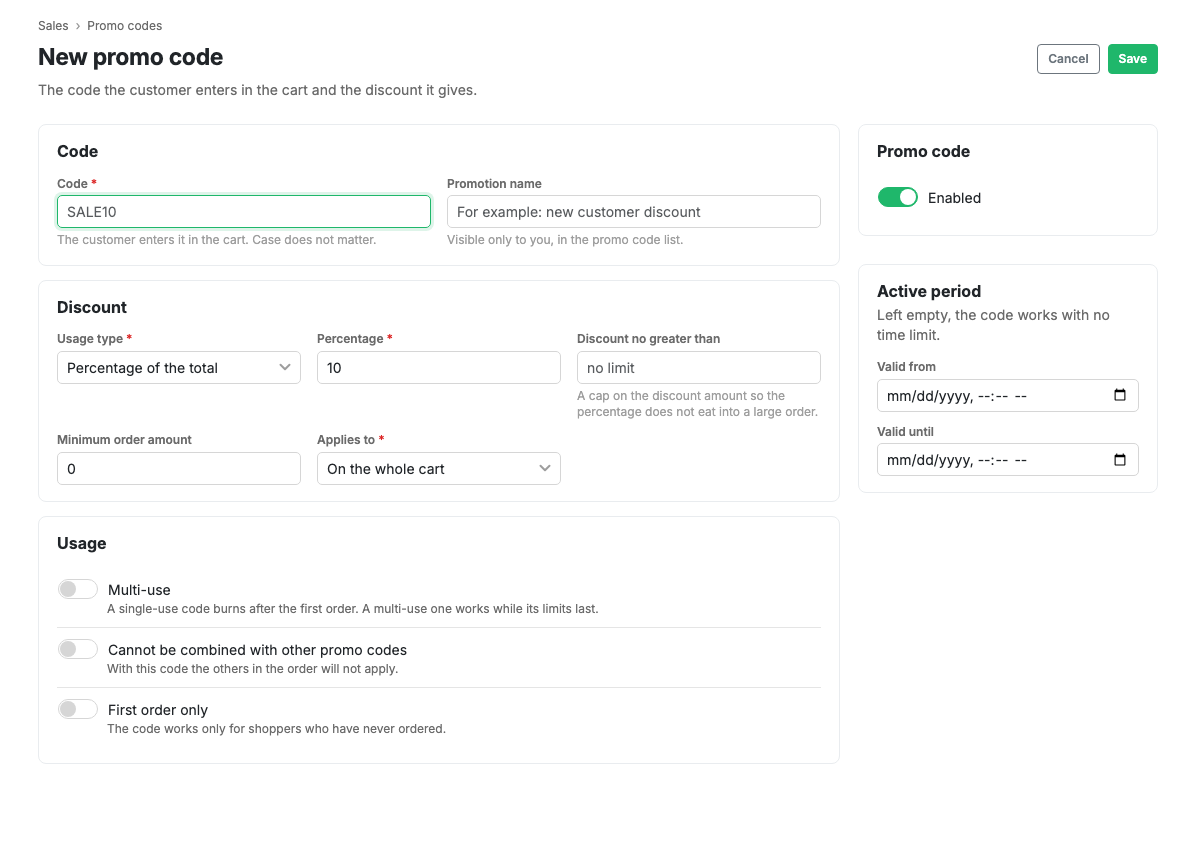
General
Code is what the shopper types. Case and hyphens do not matter; the code is stored in upper case. Campaign name is visible only to you and never shown to the shopper. The Enabled switch turns a code off temporarily without deleting it.
Discount
Discount type: a percentage of the total or a fixed amount.
Discount no more than: the ceiling for a percentage discount. For example, "20% off, but no more than 1,000". Without a ceiling, a percentage of a large order can turn out unexpectedly generous. The field is hidden for a fixed amount.
Minimum order value: the code will not work if the basket is cheaper.
Applies to: the whole basket, or only selected products, categories or brands. If you narrow it down, the discount is calculated from the matching basket lines only, not from the whole total.
Usage
Multi-use is the main switch. A single-use code burns after the first order. A multi-use one works until its limits run out:
- Total uses: how many times the code may fire in all.
- Uses per customer: how many times one person may use it.
An empty field means "no limit". For a single-use code the limits are not shown: it burns after the first use anyway.
Does not stack with other promo codes: if the shopper applies such a code, the other codes in that order will not fire. By default codes stack.
First order only: the code is offered only to shoppers with no placed orders. Such a code requires the shopper to be signed in: it will not apply for a guest.
Validity period
Valid from and valid until. Both are optional: an empty "valid from" means "already valid", an empty "valid until" means "indefinitely".
How it was used
The block appears for a saved promo code. It shows the status (used or not), the date of use, the total number of uses and the source: created by hand, generated or imported.
Below is the usage table: order, customer, discount amount and time. For a multi-use code this is the only way to see every order it fired in.
Scenarios
A discount for a new shopper
- Press "New promo code" and set a code, for example
WELCOME. - Choose the "Fixed amount" type and enter the discount.
- Set a minimum order value so the discount does not exceed the gain from the purchase.
- Turn on Multi-use and set "Uses per customer" to 1.
- Turn on "First order only".
- Save.
A discount on one category
- Create a promo code with the "Percentage" type.
- In the "Applies to" field choose "Categories only".
- List the category IDs separated by commas.
- Save.
The discount is calculated only from the basket lines that fall into those categories.
Limits and caveats
- A percentage discount cannot exceed 100.
- A code must be at least 3 characters and unique within the shop.
- Changing the code of an already distributed promo code makes the old code invalid: shoppers holding it get "Promo code not found".
- The use counter goes back down if an order is cancelled: the code returns to circulation.