
Customer card
The form for editing a shopper's details: contacts, date of birth, gender, external code and loyalty card number.
How to open it
In the customer list click the shopper's name or open the row menu.
What you can do
- Switch a shopper active or inactive
- Edit the name, contacts and date of birth
- Set an external code and a loyalty card number
The interface
The header shows the title, the shopper's number and the last sign-in date, with the Cancel and Save buttons beside them.
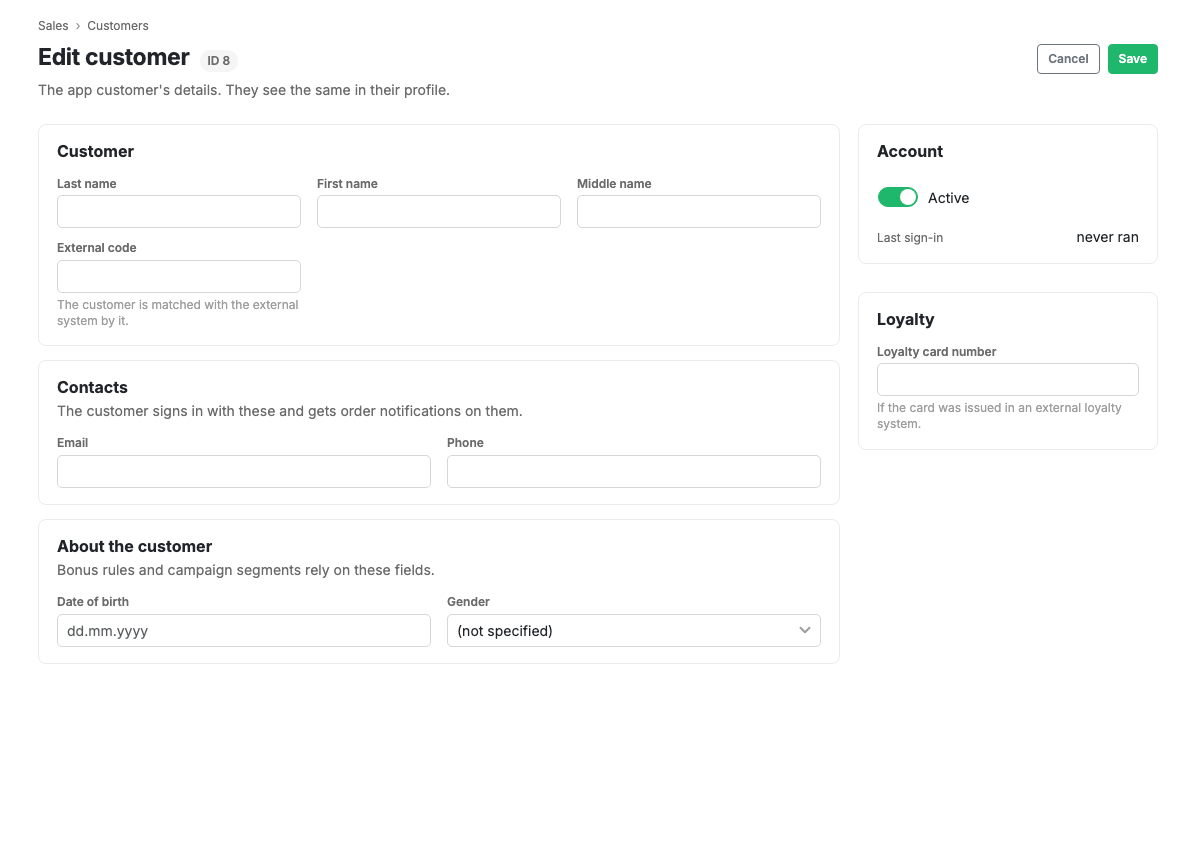
Fields
- Active: the switch for the shopper's access.
- Surname, First name, Middle name.
- Email.
- Phone number.
- Date of birth.
- Gender: male, female or not specified.
- External code: the shopper's identifier in an external system.
- Loyalty card number.
Scenarios
Attach a loyalty card
- Open the shopper's card.
- Fill in the "Loyalty card number" field.
- Press Save.
Limits and caveats
- The shopper's orders are in the order list: filter it by customer.
- The bonus balance is on the Bonus balances tab, and bonus movements are in the bonus ledger.
Related pages
Updated 04.09.2026 18:04
Was this page helpful?