
Loyalty card
This page configures the customer card in the mobile app: how it is encoded and how it looks. It is about the appearance of the card on screen; the bonus programme settings (accruals, rules) live in Loyalty and bonuses.
How to open it
The rail, the App group, Screens, the Loyalty card card.
What you can do
- Switch the loyalty card on or off
- Choose the encoding: QR code or barcode
- Set the encoding string from customer data
- Configure the title, description and refresh button of the card
The interface
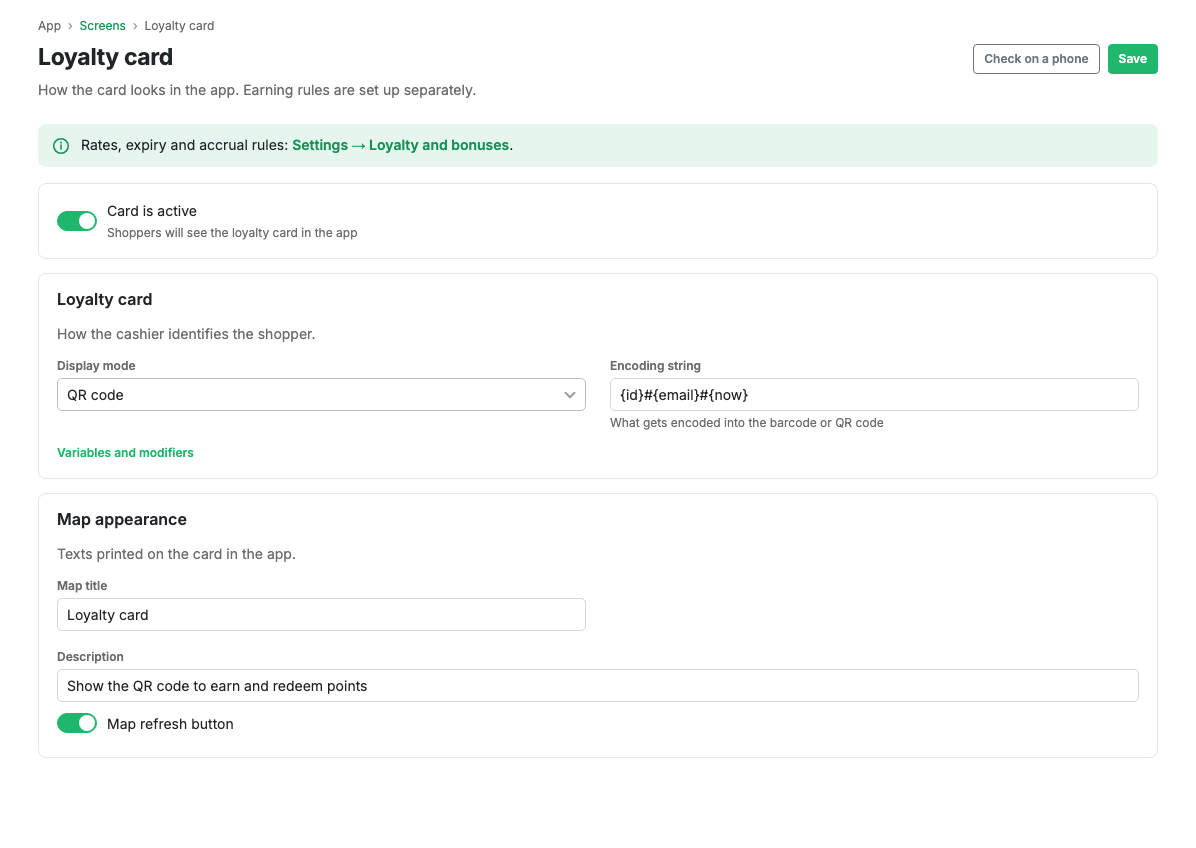
The loyalty card
- Active: turns the card on in the app.
- Display mode: QR code or barcode.
- Encoding string: the template the card code is built from out of customer data. Customer fields (name, phone, external identifier and others) are substituted into the template, with modifiers such as lower case or digits only.
Card appearance
- Card title and description: the text on the card.
- Refresh button: whether to show a refresh control.
The available fields and modifiers of the encoding string are listed on the page
itself, under the input. Placeholders are {field} or {field.modifier}, with
{a|b} as a fallback taking the first non-empty value. In barcode mode the
string is reduced to 13 digits (EAN-13).
Scenarios
Turn the loyalty card on
- Turn on the Active switch.
- Choose the mode, QR code or barcode.
- Set the encoding string if needed.
- Press Save.
Related pages
Updated 04.09.2026 18:04
Was this page helpful?